 DarkWebsite.link
Interactive guide
Who can see what when you use Tor
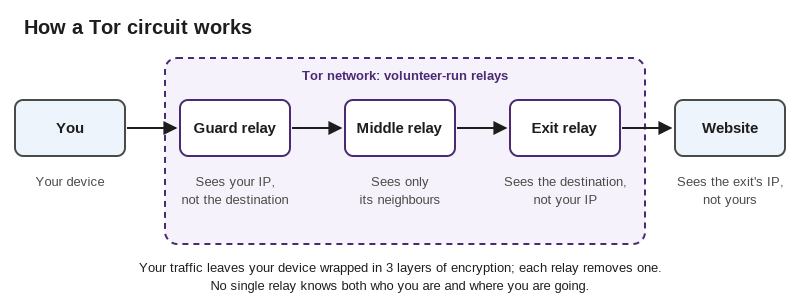
Tor splits what can be seen between several parties so that none of them sees everything. Pick where you are going and whether you use a bridge, and the table shows what each one can and cannot see.
Visiting a .onion site
| Your internet provider or Wi-Fi | Without a bridge: Sees that you connect to Tor, because guard relay addresses are public. Cannot see which site you visit or what you send. With a bridge: Sees a connection to the bridge. Transports such as obfs4, Snowflake and WebTunnel disguise it, so it is harder to tell that it is Tor. Still cannot see the site or what you send. |
|---|---|
| Guard relay (or bridge) | Without a bridge: Sees your IP address, but not which site you visit or what you send: that is still wrapped in encryption. With a bridge: The bridge takes the guard's place. It sees your IP address, but not which site you visit or what you send. |
| Middle relay | Sees only the relays on either side of it. Nothing about you or the site. |
| Exit relay | Not used. Traffic to .onion sites never leaves the Tor network. |
| Rendezvous point | The relay where your circuit meets the service's circuit. It learns neither your IP address nor the service's. |
| .onion site | Sees a connection arriving through Tor, never your IP address. Sees everything you send it, including any account you log in to. |
Visiting an HTTPS website
| Your internet provider or Wi-Fi | Without a bridge: Sees that you connect to Tor, because guard relay addresses are public. Cannot see which site you visit or what you send. With a bridge: Sees a connection to the bridge. Transports such as obfs4, Snowflake and WebTunnel disguise it, so it is harder to tell that it is Tor. Still cannot see the site or what you send. |
|---|---|
| Guard relay (or bridge) | Without a bridge: Sees your IP address, but not which site you visit or what you send: that is still wrapped in encryption. With a bridge: The bridge takes the guard's place. It sees your IP address, but not which site you visit or what you send. |
| Middle relay | Sees only the relays on either side of it. Nothing about you or the site. |
| Exit relay | Sees which website you are connecting to, but HTTPS encrypts the pages and anything you type. |
| Website | Sees the exit relay's IP address, not yours. Sees everything you send it, including any account you log in to. |
Visiting a plain HTTP website
| Your internet provider or Wi-Fi | Without a bridge: Sees that you connect to Tor, because guard relay addresses are public. Cannot see which site you visit or what you send. With a bridge: Sees a connection to the bridge. Transports such as obfs4, Snowflake and WebTunnel disguise it, so it is harder to tell that it is Tor. Still cannot see the site or what you send. |
|---|---|
| Guard relay (or bridge) | Without a bridge: Sees your IP address, but not which site you visit or what you send: that is still wrapped in encryption. With a bridge: The bridge takes the guard's place. It sees your IP address, but not which site you visit or what you send. |
| Middle relay | Sees only the relays on either side of it. Nothing about you or the site. |
| Exit relay | Sees which website you visit and can read, and even change, the pages and anything you type. Tor Browser's HTTPS-Only Mode tries to upgrade such connections to HTTPS first. |
| Website | Sees the exit relay's IP address, not yours. Sees everything you send it, including any account you log in to. |
What this means for you
- Prefer .onion addresses where an organization offers one: there is no exit relay to worry about. Our verified list has 50.
- Use HTTPS for ordinary websites, and never type passwords on plain HTTP pages.
- Use a bridge if connecting to Tor could draw attention; see Tor bridges.
- Remember the website sees what you tell it. Logging in to an account tied to your name ends your anonymity on that site. See Is Tor safe?
Frequently asked questions
- Can my internet provider see what I do on Tor?
- No. It can see that you connect to Tor, unless you use a bridge, but not which sites you visit or what you send.
- Can a Tor exit relay see my traffic?
- It can see which website you connect to. With HTTPS it cannot read the pages or what you type; with plain HTTP it can. Onion sites do not use an exit relay at all.
- Does Tor hide what I tell a website?
- No. Tor hides your IP address. Anything you send a site, such as a login or your name, is visible to that site.