 DarkWebsite.link
Tutorial
How to host an onion site
Any website can also be an onion service. You need a working web server, the tor program, and two lines in tor's configuration file. Tor then gives you a .onion address. This guide follows the Tor Project's official setup steps.
What you need
- A computer or server that can run the tor program (Linux is the common choice).
- A web server such as nginx or Apache, or any app that listens on a local port.
- Basic comfort with the command line and configuration files.
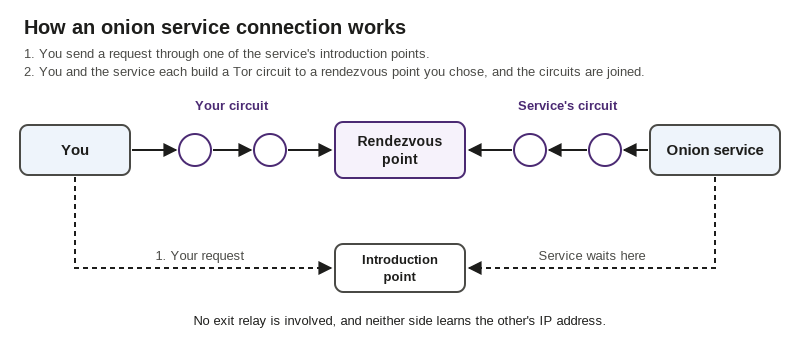
An onion service does not need a public IP address, an open port or a domain name. Tor makes outgoing connections only: visitors and your server each build circuits that meet inside the network.
Step 1: run your web server locally
Set up your site and make it listen on localhost only, for example 127.0.0.1:80. If it listens on all interfaces, the site may be reachable directly by its IP address, which can reveal the server's location.
Step 2: install tor
Install tor from your system's package manager or from the Tor Project's own package repository. On Linux the configuration file is usually /etc/tor/torrc, though the Tor Project notes it can be elsewhere on your system.
Step 3: add two lines to torrc
HiddenServiceDir /var/lib/tor/my-website/
HiddenServicePort 80 127.0.0.1:80
HiddenServiceDir is where tor keeps the service's keys and address; it must be readable and writable by the user tor runs as. HiddenServicePort says that traffic to port 80 of your onion address goes to 127.0.0.1:80, where your web server is listening.
The Tor Project suggests a Unix socket instead of a TCP port, so the service cannot leak to your local network:
HiddenServiceDir /var/lib/tor/my-website/
HiddenServicePort 80 unix:/var/run/tor/my-website.sock
Step 4: restart tor and find your address
Restart tor. In your HiddenServiceDir you will find a file named hostname, which contains your new 56-character v3 .onion address. Open it in Tor Browser to test.
Step 5: back up the keys
The other files in that directory are your service's keys. Anyone who has them can impersonate your site, so keep them private. If you plan to run the service for a long time, keep a secure backup of the private key: without it you lose the address for good.
Step 6 (optional): advertise it with Onion-Location
If you also run a clearnet site, add an Onion-Location header so Tor Browser users are offered your onion address automatically. For nginx:
add_header Onion-Location http://your-onion-address.onion$request_uri;For Apache:
Header set Onion-Location "http://your-onion-address.onion%{REQUEST_URI}s"Static sites can use an HTML meta tag instead. Onion-Location is also how visitors and lists like ours verify that an address really belongs to you.
Optional: a vanity address
Tools such as mkp224o generate keys until the address starts with characters you choose, like the CIA's "ciadotgov". Each extra character makes it far slower to find. Generate keys on a machine you trust, because whoever generates them holds them.
Avoid leaking your server
- Bind every service to localhost or a Unix socket, never a public interface.
- Turn off server status pages and detailed error pages that print the server name, version or IP address.
- Check pages, files and image metadata for anything that identifies you.
- Do not make the server fetch outside resources that could reveal its IP address.
- Keep the system and tor updated.
For the full official walk-through, read the Tor Project's setup guide on its community portal.
Frequently asked questions
- How do I create a .onion website?
- Run a web server on localhost, install tor, add HiddenServiceDir and HiddenServicePort lines to torrc, restart tor, and read your address from the hostname file.
- Is hosting an onion site free?
- The software is free. You need a computer or server to run it on, but no domain name or public IP address.
- Can I choose my onion address?
- Only the first few characters, using a vanity generator such as mkp224o. The rest of the address is always random.
- Do onion sites need HTTPS?
- No. Tor encrypts the connection end to end. Some organizations add HTTPS so a certificate ties the address to their name.
Sources
Checked 23 November 2026. We cite primary sources wherever possible; see our editorial policy.
- Tor Project: Set up your onion service
- Tor Project: Onion-Location
- Tor Project: Understanding onion services in Tor Browser
- mkp224o vanity address generator (GitHub)
Related guides
- How onion services work
- What is a .onion link?
- Is Tor safe?
- I2P vs Tor: how the anonymity networks differ
Looking for addresses? See our 50 verified .onion links, or check one with the onion address checker.